


Weather data & microclimate :
4.7161.50K Reviews
App Specs
- Version
- 6.20.1
- Updated On
- License
- Free
- Downloads
- 10,000,000+
- Developer
- Weather Underground
- Categories
- Weather
- Platform
- Android, iOS
Screenshots
 Analysis by AppCompare
I plan my day around small weather decisions more often than I notice: whether to walk, carry a jacket, water plants, or leave extra time for a wet commute. A broad city forecast can be technically useful and still miss what is happening near home or work. That gap is the recurring problem Weather Data & Microclimate is meant to help with: it is a free weather app from Weather Underground that puts local conditions, forecasts, radar, and maps in one place. I would consider it when a quick glance at a standard weather app leaves me wondering whether the forecast really fits my part of town.
The practical test is not how many weather details an app can display, but whether it helps me make a decision with less checking and less guesswork. Weather Underground has built this app around weather information, including local tracking and map views. It has a 4.8 average from around 611,000 ratings, and more than 10 million installs. Those figures suggest it has found a substantial audience, though they do not guarantee that every forecast will match every street or that every screen will suit every user.
Why a local forecast can save time
City-level forecasts are convenient, but weather does not always behave as if it knows where a municipal boundary lies. A shower may pass over one neighborhood while another stays dry; wind and temperature can also feel different across a short trip. When I am deciding whether to walk to a nearby errand or take a longer route, a map and a more localized view can be more useful than repeatedly refreshing a single summary.
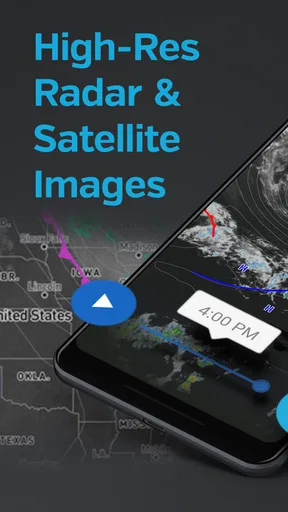
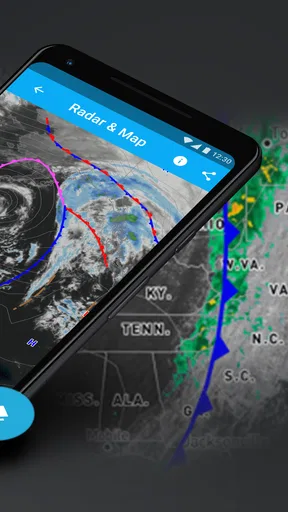
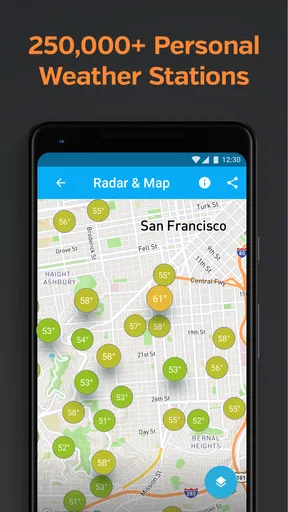
That is where this app’s focus on hyperlocal conditions makes sense. Its store summary points to radar, weather maps, and the ability to follow a weather station. Those tools give me different ways to inspect the same situation: a forecast for planning, a radar view for approaching precipitation, and a station-oriented perspective for local observations. The useful benefit is having context before I commit to a plan, rather than treating one city-wide icon as a promise.
First setup: make the home screen useful
On first use, I would start by choosing the locations I actually need, rather than collecting a long list of places I rarely check. Home and work are often enough for everyday decisions; a relative’s town or a regular weekend destination can be added if it affects plans. Keeping that list short makes switching locations quicker and reduces the chance that I read the wrong forecast in a hurry.
I would also spend a moment deciding which information deserves attention. If I mainly need to know whether rain may disrupt a commute, radar and precipitation details matter more than exploring every map layer. If I am planning an outdoor activity, the broader forecast and changing conditions are more relevant. Weather apps can become cluttered when every available number competes for attention, so I find it helpful to use a simple question as a filter: what decision am I trying to make?
The app is free to download, with in-app purchases listed at $1.99 to $19.99 per item. I would begin with the free experience and see whether its core weather views fit my routine before considering any purchase. Its content rating is Everyone, which makes it broadly suitable for general audiences. The current version is 6.19.1, and the listed minimum operating system is 8.0, so device compatibility is worth checking before installing on an older phone.
Worth Reading Before You Choose

Flipboard Shows What News Apps Must Do Beyond the Feed

Switching to Android Auto Means Rethinking Your Driving Routine

Google Calendar Makes a Crowded Week Easier to Manage

Ludo King Makes the Most of the Minutes Between Plans

Baby Panda World Brings Quick Play to Modern Phones, but Its Game Library Feels Busy

ESPN’s Live Game View Makes Following Close Games Easier
Using Weather Data & Microclimate in everyday life
I use this section to focus on the everyday choices where a local weather check can make a difference, from deciding when to leave to choosing what to bring along. I also look at how I’d keep those checks quick: start with the decision at hand, then turn to a map or station view only when the basic forecast leaves a real question unanswered.
Small decisions where radar and maps help
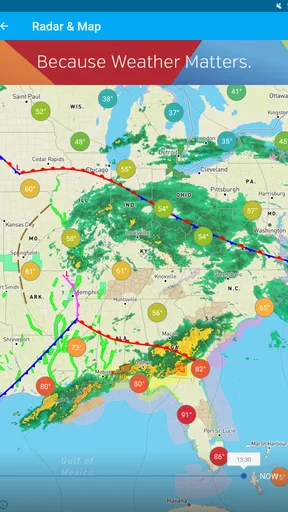
A realistic use case is a weekday walk when the sky looks uncertain. I can check the local forecast before leaving, then look at radar if rain appears possible. If the map suggests precipitation is nearby, I might take an umbrella or shift the walk; if it is moving away, I can avoid carrying extra gear unnecessarily. That is a modest benefit, but repeated small decisions are where a weather app can save time and frustration.
For a commute, I would use the forecast to plan the general part of the day and the radar closer to departure. These views answer different questions: a forecast helps with what conditions may be like later, while radar can help me judge what is happening around me now. I would not treat either as a guarantee. A fast-changing shower can shift, and local conditions may not line up perfectly with a broad forecast, so I still leave room for common sense when the consequences matter.
For gardening, the app can help me decide when to check the weather before watering or working outside. It does not replace observing the soil or the plants, but local rain information can prevent me from relying on a forecast for a distant part of town. Likewise, someone arranging a picnic or an outdoor exercise session can use the map and forecast as planning aids, then recheck nearer the time instead of making a decision days in advance and assuming conditions will stay fixed.
Getting more from the weather station angle
The option to follow a weather station is a useful distinction from apps that only present a polished forecast for a named city. If a nearby station is relevant to my routine, I can use its local perspective as another point of reference. I would compare that observation with the broader forecast rather than assuming any single station represents every block around it. This is especially important in places where terrain, buildings, or distance can make conditions vary.
A practical habit is to check the station or map when the general forecast seems out of step with what I see outside. If the app says conditions are changing but my immediate surroundings look calm, I can inspect the wider picture before deciding whether to delay a trip. Conversely, if the sky is darkening while the forecast still looks comfortable, radar may offer useful context. This is not a way to outsmart the weather; it is a way to make one source of information more legible by checking it against another.
Weather Underground has been available since December 19, 2011, and the app’s emphasis on local weather data is a clear part of its identity. In my view, that matters most to people who check conditions often enough to benefit from a map or a station, not to someone who only wants a single temperature reading once in a while. The extra detail has value when it changes a decision; otherwise, it can be more information than a casual user needs.
Where it fits beside simpler weather apps
Compared with the default weather app on a phone, this one makes more sense when I want to move beyond a compact forecast card. A built-in app is often quicker for checking the temperature or glancing at the day’s outlook, and that simplicity is a real advantage. Weather Data & Microclimate is more appealing when I want to inspect radar, explore maps, or consider conditions at a more local scale.
Compared with a dedicated radar tool, its strength is having several kinds of weather information together rather than focusing only on a moving precipitation display. A specialist radar app may be a better fit for someone who spends a lot of time tracking storms and wants that single task to be the center of the experience. I would choose this app when I want a more rounded weather check; I would choose a narrower tool if one particular map view is all I need.
That trade-off is also about attention. More choices can reduce the need to switch between apps, but they can make the first few visits feel busier than a bare-bones forecast. I would resist browsing every available view just because it is there. Pick the two or three screens that answer your regular questions, and the app is more likely to remain a time-saver instead of becoming another place to scroll.
What works well, and where I would be cautious
The strongest case for this app is the combination of local weather focus with radar and maps. When conditions are changing, being able to inspect the surrounding area can be more useful than reading a single forecast sentence. The ability to follow a station adds another angle for people who care about nearby observations. For a commuter, an outdoor worker, a gardener, or anyone who routinely plans around rain, those tools can make a quick check more informative.
The limitation is that extra detail does not automatically mean greater certainty. A map takes interpretation, and a forecast remains a forecast. If I need a fast yes-or-no answer and do not want to inspect conditions, a simpler app may feel more direct. If I am making a high-stakes decision, such as whether it is safe to travel in dangerous weather, I would not rely on one consumer weather app alone; I would seek appropriate official guidance and use the app as supporting context.
Alerts can be valuable when I cannot keep checking the screen, but I would keep them purposeful. Too many notifications can create the very friction the app is supposed to remove, while an alert that arrives at the wrong moment may be easy to ignore. I would enable only the kinds of changes that could genuinely alter my plans and review the settings after using the app for a while. That makes alerts a useful prompt rather than a stream of interruptions.
Who should choose it, and who can skip it
I think Weather Data & Microclimate is a good fit for people whose days depend on local conditions: walkers, cyclists, gardeners, commuters, and anyone who regularly spends time outdoors. It is also suitable for curious users who like seeing weather patterns on a map instead of accepting a short summary. If you often ask whether rain is approaching your neighborhood rather than merely your city, the app’s more local emphasis is relevant.
I would skip it if all I want is a quick temperature check and a simple daily outlook. A standard phone weather app may be faster to open and easier to understand for that narrow need. I would also look elsewhere if I want a highly specialized interface devoted to one task, such as intensive storm analysis, rather than a broader weather utility. The best choice depends less on which app displays the most information and more on whether its information matches the decisions I actually make.
One question people often have is whether local detail can remove the need to check the weather again. I would say no: the advantage is better context, not certainty. If the day is changeable, a fresh look before leaving is still sensible. Another practical question is whether the app is worth trying before paying. Since it is free to download and has optional in-app purchases, I would start without buying anything and decide based on whether the available views help with real plans.
People may also wonder whether they need a personal weather station to benefit from the app. Its summary highlights the ability to follow a weather station, but the broader appeal is its weather information, radar, and maps; I would not assume that owning equipment is necessary to get value from checking conditions. Finally, if a map feels confusing at first, I would use it for one question at a time—such as whether rain is moving toward my route—rather than trying to interpret every detail at once.
Final thoughts
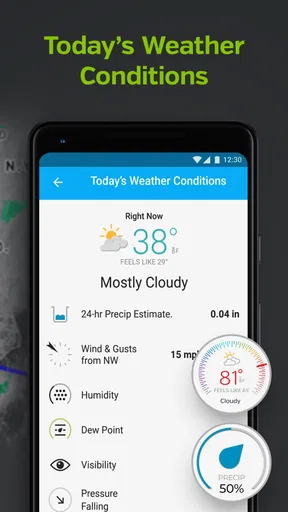
First off, what struck me was how clean and user-friendly the interface is. You open the app, and bam, you’re greeted with a sleek dashboard displaying the current weather conditions. It’s not cluttered with unnecessary details, just the essentials like temperature, humidity, and wind speed.
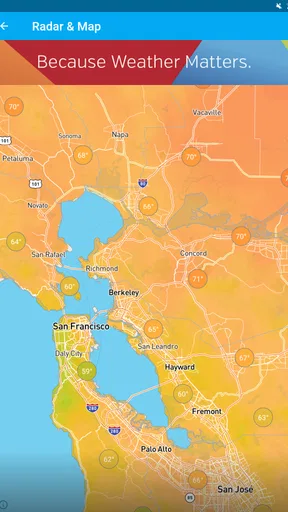
One of the standout features is the microclimate tracking. If you’re in a region with unpredictable weather patterns, this feature is a lifesaver. It provides hyper-local weather updates, so you’re always in the know about what’s happening right where you are. No more getting caught in the rain because you relied on a generic city-wide forecast!
Dive into Detailed Forecasts
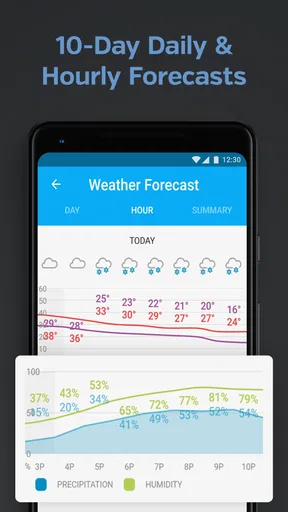
If you’re someone who likes to plan ahead, the app offers detailed 7-day forecasts. These aren’t just your standard “it might rain” predictions. We’re talking about hour-by-hour breakdowns that give you insights into temperature fluctuations, precipitation chances, and potential weather alerts.
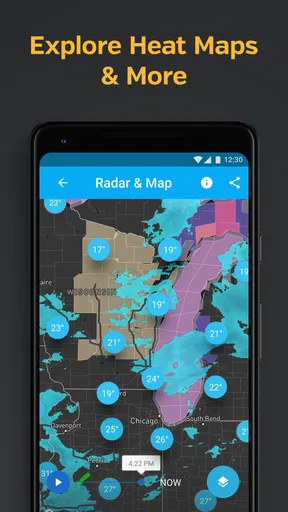
Another cool feature is the interactive weather map. It’s like having a little weather station in your pocket. You can zoom in and out, track storm systems, and even follow wind patterns. For those who geek out over weather data, this is an absolute treat.
Customization and Alerts
Customizability is where this app shines. You can set up alerts tailored to your preferences. Want to know when it’s going to rain so you can grab an umbrella? Done. Need a heads-up about extreme weather conditions? The app’s got your back.
And hey, if you’re into widgets, Weather Data & Microclimate offers some pretty neat ones. You can have a quick glance at the weather without even opening the app. It’s the little things that make a difference, right?
User Experience and Accessibility
Now, let’s talk about user experience. The app is not only intuitive but also accessible. Whether you’re tech-savvy or not, navigating through the app is a breeze. It’s designed to cater to everyone, ensuring that all users can benefit from its features without a steep learning curve.
Plus, it integrates smoothly with your device’s settings. You can sync it with your calendar, set reminders, and even share weather updates with friends and family. Sharing is caring, after all!
Final Thoughts
In conclusion, the Weather Data & Microclimate app is more than just a weather app. It’s like having a personal meteorologist at your fingertips. With its accurate forecasts, customizable alerts, and user-friendly interface, it’s definitely worth checking out.
If you’re someone who likes to stay ahead of the weather game, give it a download. Who knows? It might just save you from getting drenched on your next outing!
Pros
- Accurate hyper-local weather updates.
- User-friendly interface with intuitive design.
- Customizable alerts for severe conditions.
- Detailed hourly and daily forecasts.
- Interactive radar maps enhance planning.
Cons
- Occasional ads can disrupt user experience.
- Requires constant location access for accuracy.
- Premium features locked behind paywall.
- Battery consumption is higher than expected.
- Limited widget customization options.
FAQs for Weather data & microclimate :
What features does the Weather Data & Microclimate app offer?
The Weather Data & Microclimate app provides real-time weather updates, detailed forecasts, and climate analysis. It offers features like radar maps, severe weather alerts, and personalized weather notifications. Users can access historical weather data and microclimate insights for specific locations, enhancing their understanding of local weather patterns.
How accurate is the weather forecasting in this app?
The app uses advanced meteorological models and data from various sources to ensure high accuracy in weather forecasting. While no forecast is perfect, the app’s use of microclimate data helps improve precision, especially in areas with diverse geographical features. Users can rely on frequent updates to stay informed.
Is the app user-friendly for beginners?
Yes, the app is designed with a user-friendly interface, making it easy for beginners to navigate. It offers intuitive design elements, such as simple icons and clear instructions, ensuring that users can quickly access the information they need without any technical hurdles.
Does the app offer any customization options for users?
The app allows users to customize their experience by setting location preferences, selecting notification types, and choosing specific weather parameters to track. This personalization ensures that users receive relevant and timely information tailored to their needs, enhancing the overall utility of the app.
Are there any subscription fees or in-app purchases?
The basic features of the Weather Data & Microclimate app are free to use. However, there may be premium features available through a subscription model, such as advanced analytics, ad-free experience, and enhanced radar maps. Users should review the pricing details within the app to decide if the premium options are worth it for their needs.


